Free MGRS Grid Overlay: Military Grid Reference System
March 21, 2026 · Updated July 2, 2026
MapGridder supports MGRS (the NATO-standard geocoordinate grid) as a free, browser-based overlay. Switch between a custom metric grid, MGRS, a plain UTM grid, and a lat/long graticule with one click. No account and no GIS software needed, and it is free for personal and non-commercial use. Just open the tool and it works.
Until now, overlaying a proper MGRS grid on an interactive map meant purchasing desktop GIS software, subscribing to a paid mapping service, or wrestling with outdated plugins that barely ran in modern browsers. The free options were essentially nonexistent. This changes that.
What Is the MGRS Grid?
MGRS (the Military Grid Reference System) is a NATO-standard geocoordinate system. It builds on the UTM (Universal Transverse Mercator) projection and organizes the Earth into a nested hierarchy of zones, each uniquely identified with a short alphanumeric code:
| Level | Size | Example | Use |
|---|---|---|---|
| Grid Zone Designator (GZD) | 6° × 8° | 33T | Theater / continental |
| 100km Square | 100 km | 33T UN | Regional planning |
| 10km Grid | 10 km | 33T UN 45 12 | Operational areas |
| 1km Grid | 1 km | 33T UN 456 123 | Field surveys, hike segments |
| 100m Grid | 100 m | 33T UN 4567 1234 | Site planning, OSINT graphics |
| 10m / 1m Grid | 10 m / 1 m | 33T UN 45678 12345 | Building-level reference |
The key advantage of MGRS over a custom metric grid is standardization. When a teammate sends a grid reference like 33T UN 45 12, anyone with a map (digital or paper) can find that exact location without any shared origin point or coordinate conversion. The grid boundaries are fixed by the UTM projection, identical everywhere in the world, and the same system you will see on most consumer GPS units that support grid display.
Why a Free MGRS Overlay Barely Existed Before
Rendering a correct MGRS grid is significantly harder than drawing a simple metric grid. A custom grid just divides meters evenly; the math is straightforward. MGRS follows the UTM projection, which means:
- 60 separate projections: one per 6° longitude zone. Grid lines are not straight in latitude/longitude space; they curve as you approach zone boundaries.
- Zone boundary exceptions: Norway and Svalbard have irregular zone widths to avoid splitting inhabited areas across zones. A correct implementation must handle these special cases.
- Hemisphere seams: the equator splits northing values, requiring separate coordinate calculations for the northern and southern hemispheres.
- Alphanumeric square identifiers: 100km square IDs follow a cycling pattern that repeats every third zone column and every other zone row, with I and O excluded to avoid ambiguity. Computing these deterministically requires the full UTM math.
Tools that got this right charged for it. The ones that were free either skipped the edge cases or were abandoned years ago and no longer load in modern browsers.
Built on the Standard's Official Reference Library
The MGRS coordinate math in MapGridder is powered by the official reference implementation of the standard, written by the same authority that defines and maintains MGRS.
Most MGRS implementations on the web are community ports. Someone read the spec and wrote their own version. Some are accurate. Many have subtle errors: wrong 100km square letter assignments in certain zones, incorrect handling of the Norway/Svalbard exceptions, or broken behavior near the equator. You would not necessarily know unless you cross-checked against the reference.
Using the official reference removes the algorithmic uncertainty around square letter assignments and zone exceptions. Visual placement on the map still depends on the basemap's registration accuracy; for survey-grade work, validate against an authoritative source. The math runs entirely in your browser, with no API calls and no server.
How to Use the MGRS Grid Overlay
- Open the grid panel: click the grid icon in the toolbar.
- Select MGRS: at the top of the panel, switch the Type toggle from Custom to MGRS (the same selector also offers UTM and Lat/Lng, more on those below).
- Choose your Detail level: pick the maximum precision you need: 100km, 10km, 1km, 100m, 10m, or 1m. The grid automatically shows coarser levels when zoomed out and finer detail as you zoom in, up to your chosen cap.
- Set color and line width: same controls as the custom grid.
- Hit “Set Grid”: the MGRS grid appears immediately. GZD zone boundaries are always visible; 100km squares and finer sub-grids appear as you zoom in.
- Export: screenshot the result with the camera tool. Full screen or snip area. Clean output, no watermark.
You can switch back to the custom grid at any time using the same toggle; your custom grid settings are preserved independently.
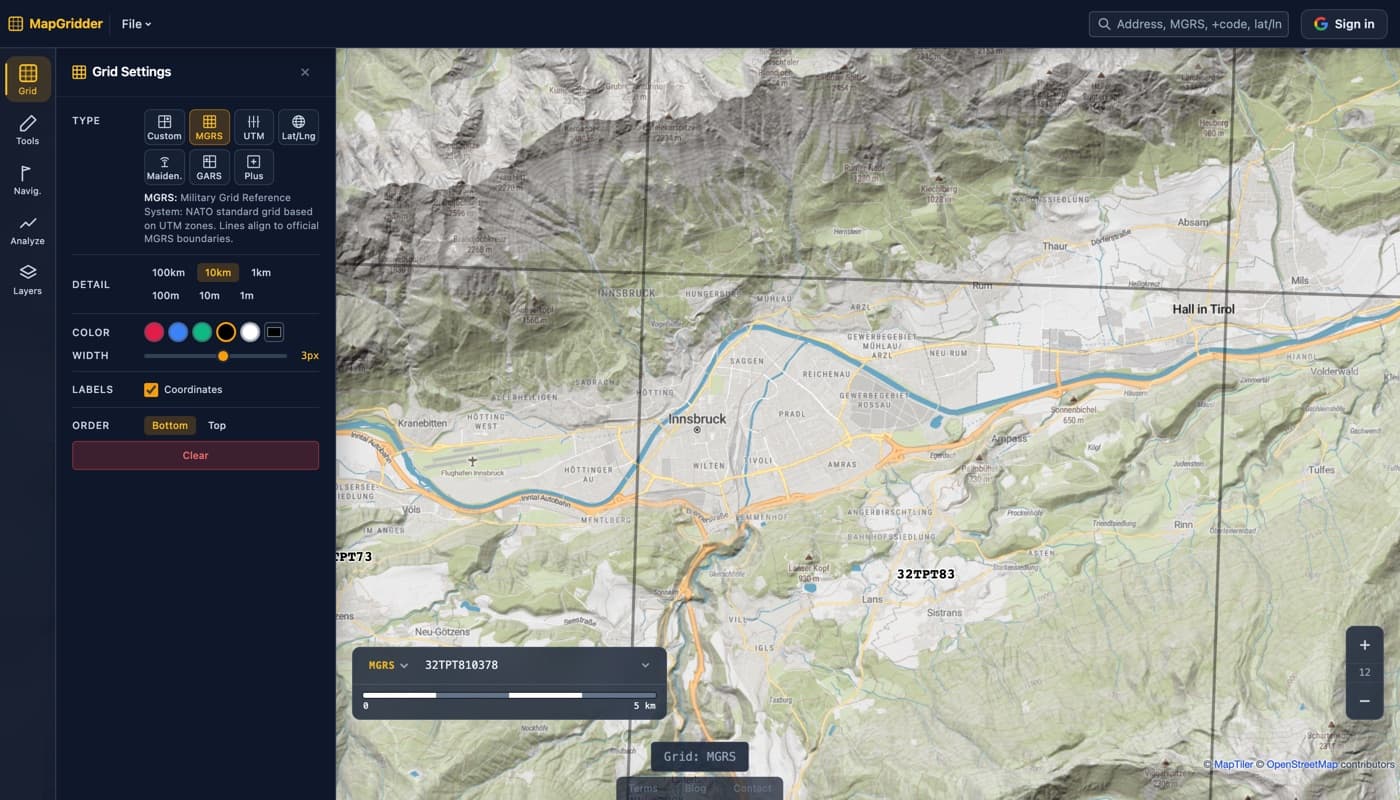
Zoom-Adaptive Detail: It Knows What to Show
One of the most useful aspects of the implementation is automatic zoom-to-precision scaling. Rendering a 1m MGRS grid at continent zoom would produce millions of lines, useless and unusable. Instead, the overlay shows the appropriate grid level for your current zoom:
| Zoom Level | Grid Shown | Typical View |
|---|---|---|
| 1–4 | GZD zone boundaries only | Continent / hemisphere |
| 5–7 | 100km squares | Country / region |
| 8–10 | 10km grid | Province / county |
| 11–13 | 1km grid | City / operational area |
| 14–16 | 100m grid | Neighborhood / base |
| 17–18 | 10m grid | Block / building |
| 19+ | 1m grid | Room / precise location |
Your chosen Detail cap acts as a ceiling. If you set it to 1km, the grid will never render finer than 1km squares regardless of how far in you zoom. This is useful for operational planning where you want to keep the reference frame consistent.
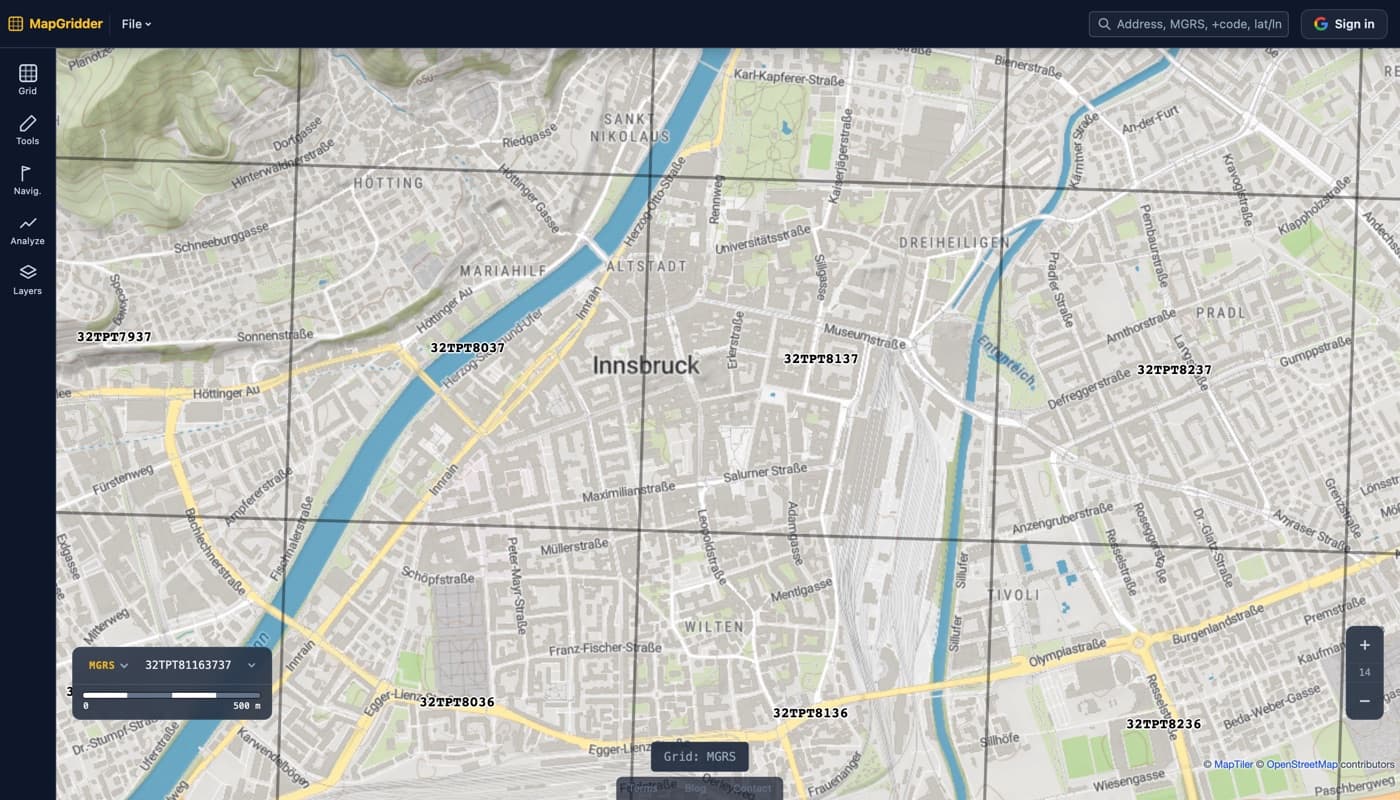
Not Just MGRS: UTM and Lat/Long Grids Too
Update, July 2026: the same Type selector now offers two more standard reference grids, so you can match whatever map or dataset you are working against:
- UTM grid: the plain easting/northing version of the projection MGRS is built on. It draws the 6° zone meridians and the equator, and labels each grid line with the two-digit principal numbers (…34 35 36…) exactly the way paper military and topographic maps do, with one full easting/northing reference in the corner for orientation. Same Detail ladder as MGRS, from 100km squares down to 1m.
- Lat/Long graticule: lines of constant latitude and longitude at clean angular steps. Zoomed out you get 10° lines; zoom in and it refines through degrees, minutes, and seconds down to a 1″ grid, with labels like 34°55′58″E along the map edges. Detail can stay on Auto or be pinned to a fixed step.
Both share the MGRS grid's color, line width, and label controls, and both scale their detail with zoom the same way. If you are unsure which system fits your work, see MGRS vs UTM vs lat/long, explained.
Who Uses an MGRS Grid Overlay?
MGRS is a standardized way to point at a square on a map. That is useful for a much wider range of people than the "Military" in the name suggests:
- OSINT analysts and researchers: map publicly reported coordinates from social media, satellite imagery, or news reports onto a consistent grid for analysis or explanatory graphics. The same standard that published OSINT projects (CSIS, FAS, journalist investigations) use.
- Navigation instructors and students: teach MGRS concepts interactively. Zoom to any location, overlay the grid, and practice reading references in real terrain rather than on abstract diagrams.
- Outdoor enthusiasts and GPS users: many consumer GPS units (Garmin, Suunto) can display MGRS coordinates. Pre-plan routes using grid references that match what your device will show in the field.
- Geocachers and orienteering enthusiasts: use grid references for puzzle hides and cross-event coordination without sharing raw lat/lng strings.
- Map enthusiasts and armchair geographers: explore how locations sit on a worldwide standardized coordinate system. Compare grid squares between regions, learn how UTM zones work, see why zones bend around Norway.
- Hobbyist designers and filmmakers: create authentic-looking map props or scenario sketches with accurate MGRS grids.
Pair MGRS With the Rest of the Toolset
The MGRS grid does not exist in isolation; it works alongside every other tool in MapGridder:
- Annotations: draw lines, arrows, polygons, and circles on top of the MGRS grid. Mark areas of interest, corridors, no-go zones, or boundaries. Every shape supports color, line width, and fill.
- Waypoints: drop labeled markers at key grid references: rendezvous points, checkpoints, points of interest. Labels appear on export.
- GPX import: import a track from a GPS device, overlay the MGRS grid, and annotate the route with notes. Export as a clean reference image.
- Distance measurement: measure straight-line or multi-point distances across MGRS grid cells. Read how the measure tool works.
- Snip export: select a specific area of the map for export. Ideal for clipping a single area defined by MGRS boundaries without exporting the full screen.
Frequently Asked Questions
What is the MGRS grid?
MGRS (Military Grid Reference System) is a NATO-standard geocoordinate system that divides Earth into nested zones: Grid Zone Designators (6° × 8°), 100km letter-pair squares, and metric sub-grids down to 1 meter. A full MGRS reference like 33T UN 45678 12345 identifies a 1m square anywhere on Earth.
Is this MGRS overlay really free to use?
Yes. No license fee and no account for the overlay; exports are watermark-free and need only a quick, free sign-in. The coordinate math runs entirely in your browser. Personal and non-commercial use is free; commercial use needs a paid license.
How accurate is it?
The MGRS coordinate math comes from an authoritative reference implementation of the standard, which handles the full UTM projection including Norway, Svalbard, and polar region exceptions. Visual placement on the map still depends on the basemap. This is a planning and reference tool, not a navigation-grade instrument; do not rely on it for safety-critical decisions.
What grid types are available besides MGRS?
Four in total. Custom gives you a free-form metric/imperial grid; MGRS gives you the official NATO system; UTM gives you plain easting/northing lines with military-style two-digit grid numbers; and Lat/Long gives you a degree/minute/second graticule. Switch between them any time with the Type toggle; your settings are preserved per mode.
Does it work offline?
The MGRS math runs entirely in your browser with no server dependency. Once the page has loaded, the grid calculation works without an internet connection. Map tiles still require connectivity to render, but the grid itself is offline-capable.
What projection does the MGRS overlay use?
UTM (Universal Transverse Mercator), the same projection used by the official MGRS standard. Grid lines follow UTM zone boundaries; they are not simple latitude/longitude lines, which is why most free tools don't attempt proper MGRS rendering.
Open mapgridder.com, click the grid icon, switch to MGRS, and set your precision level. The grid is live in seconds. No software, no account.