Free Map Grid Tool: No Watermark, No Fees
March 9, 2026
MapGridder is a free tool for personal and non-commercial use that overlays a customizable grid on interactive maps. It needs no login to use, adds no watermark to exports, and has no subscription. Open it in your browser and start using it; a quick, free sign-in is only needed when you export a finished map.
If you've ever searched for a free map grid tool, you already know the frustration. Most results fall into one of three categories: paid software disguised as free, tools that slap a watermark on every export, or services that demand an account before you can do anything. Finding a genuinely free, no-strings-attached map tool is surprisingly difficult.
The Problem With "Free" Map Tools
Most browser-based mapping tools restrict at least one core feature behind a paywall or registration wall. The pattern is predictable:
- Watermarked exports: you can use the tool for free, but every screenshot or PDF includes a logo overlay. Removing it costs $10–30/month.
- Mandatory sign-up: before touching any feature, you need to create an account, verify your email, and often provide a credit card "just in case."
- Feature gating: basic panning is free, but grids, measurements, or exports require a premium plan.
- Usage limits: free for 3 exports per month, then $15/month for unlimited.
For anyone who needs a quick grid overlay for a single project (an event layout, a hike plan, a quick site sketch, an OSINT graphic), these barriers are absurd. You shouldn't need a subscription to draw lines on a map.
What MapGridder Gives You, For Free
Every feature is unlocked for every visitor, with no paywall and no feature gating (a quick, free sign-in is only needed to export):
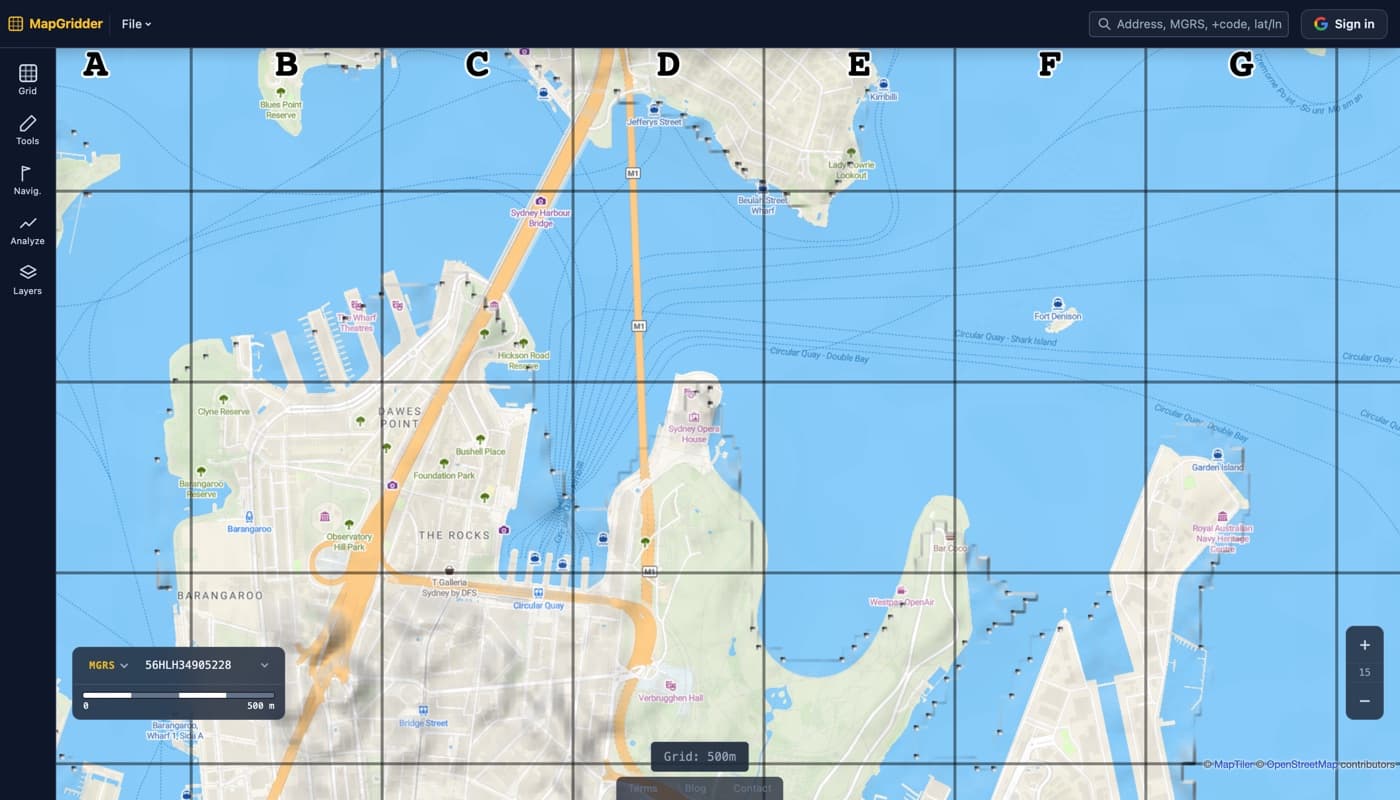
- Unlimited grid overlays at any custom cell size between 10 and 10,000 meters, plus the NATO-standard MGRS grid.
- Full grid styling: color, line width, row and column labels, metric and imperial units.
- Multi-point distance measurement built into the same toolbar.
- Draw annotations (lines, arrows, polygons, rectangles, circles) and labeled waypoints on top of the map.
- Clean screenshot export (full screen or snip a selected area) with no watermark and no branding, after a quick, free sign-in.
- GPX and KML import for visualizing existing tracks and waypoints.
- Auto-saved projects stored locally in your browser, no cloud account required. Sign in to keep named maps in your account and open them on any device.
A few of these features (custom grid sizes, clean exports, GPX import, row/column labels) are common pain points on free map tools, which often gate them behind a premium tier or stamp watermarks on the export. MapGridder leaves all of them on for everyone.
How MapGridder Fits Alongside Other Tools
MapGridder is not trying to replace full GIS platforms or cloud-based mapping services. It fills a specific gap: a quick, no-friction tool for adding a reference grid, annotations, and measurements to any map. Here is where it fits relative to common alternatives:
- Google My Maps: Great for sharing annotated maps via a Google link. Requires a Google account, no grid overlay, and no clean screenshot export. Use it when you need cloud sharing; use MapGridder when you need a grid overlay or a clean export and want to start with no account.
- CalTopo: A powerful tool for backcountry planning with USGS topo layers, slope shading, and team collaboration. Feature-rich but requires a paid plan for offline use and advanced features. MapGridder is the lighter, zero-friction alternative for basic grid and measurement work.
- gpx.studio: Purpose-built for editing GPX tracks (merging, trimming, routing). Excellent for manipulating track data. No grid overlay. Use it to prepare your GPX, then import into MapGridder to annotate and present.
Who Uses Free Map Grid Tools?
Grid overlays aren't niche. They're used across a surprising range of fields:
- Event planners: Divide venue areas into labeled zones for vendors, stages, and emergency routes. See 5 planning use cases.
- Search & rescue teams: Assign grid cells to teams for systematic area coverage.
- Construction managers: Quick site reference without deploying full GIS software.
- Teachers & students: Learn grid referencing basics with a hands-on tool.
- Hikers & outdoor enthusiasts: Estimate distances and plan routes with a visual grid. Works great alongside the built-in measure tool.
- OSINT analysts and researchers: standard grid referencing for open-source intelligence graphics and briefing overlays.
How It Works (30 Seconds, Zero Friction)
- Open mapgridder.com in any browser.
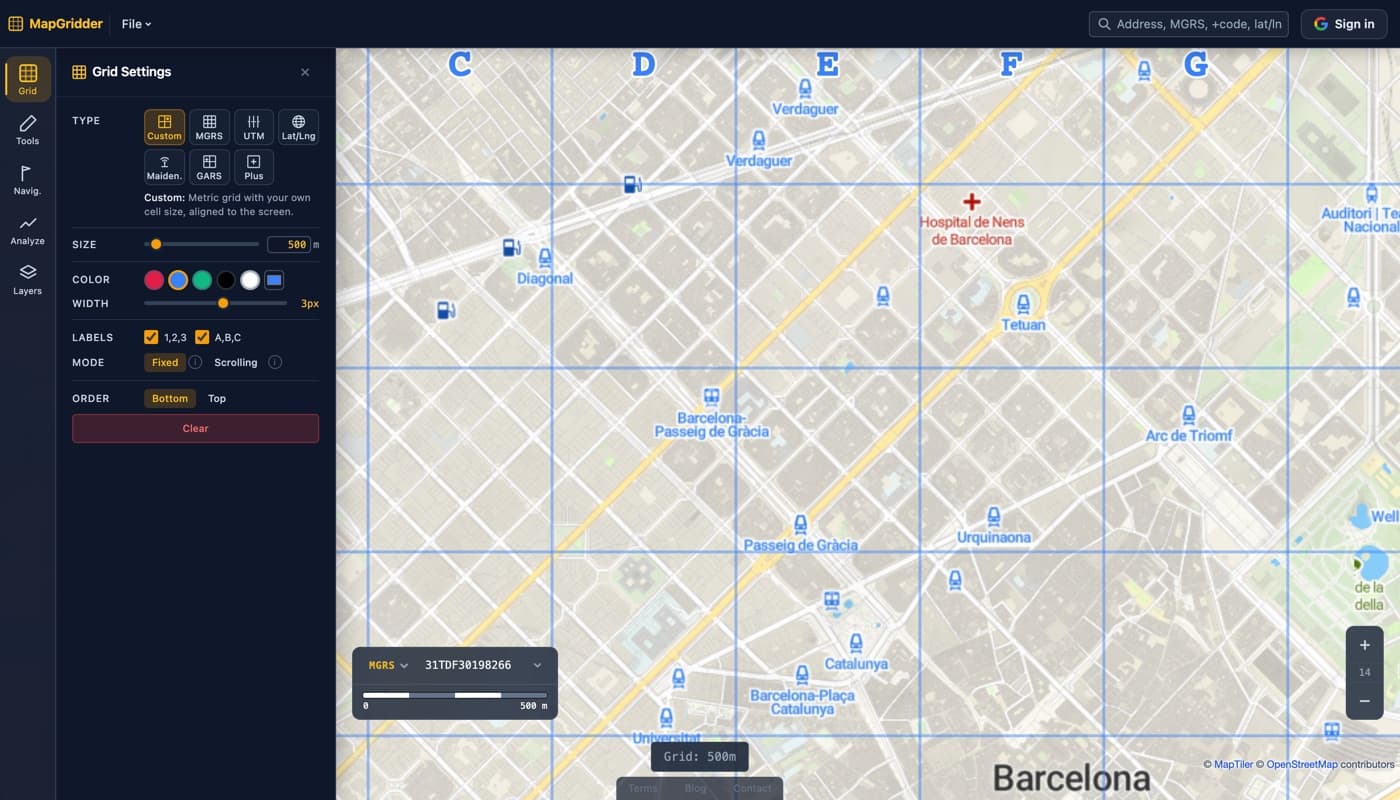
- Click the grid icon in the toolbar.
- Set your cell size: drag the slider or type a value (10 to 10,000 meters, or switch to feet).
- Pick a color and line width: choose from presets or use a custom color.
- Hit "Set Grid": the grid appears instantly. Pan and zoom freely; it stays aligned.
- Export: take a clean screenshot (full screen or selected area) after a quick, free sign-in. No watermark, no fee.
Privacy: Minimal Data, Optional Sign-In
Your map content stays in your browser. Annotations, waypoints, and exports are never uploaded to our servers. Signing in is optional and only needed to export; if you do, we keep a few basic account details (name, email, profile picture) and nothing more, no cross-site profile, and we do not sell your data. The site does use an analytics provider for aggregated traffic stats, and the map itself loads tiles and place search from a mapping provider and wildfire data from a public source, all of which see your viewport. See the Terms for the full picture.
Frequently Asked Questions
Is MapGridder really free to use?
Yes. No subscription, no premium tier, no feature locks. Every tool works for every visitor; only exporting a finished map needs a quick, free sign-in. Personal and non-commercial use is free; commercial use needs a paid license.
Do I need to sign up or create an account?
Not to use the tool. Open the site and use it immediately, with no registration. Exporting a finished map asks for a one-tap sign-in with an existing account, so there is no new email or password to set up.
Are exported screenshots watermarked?
No. Exports are clean: no watermarks, no branding, no "made with" badges. What you see is what you get.
What grid sizes are supported?
10 to 10,000 meters (or the equivalent in feet). You can switch between metric and imperial units with one click.
Can I draw on the map?
Yes. The draw tool lets you annotate the map with lines, arrows, polygons, rectangles, and circles, each with custom color, line width, and fill. You can also drop labeled waypoint markers (POIs) anywhere on the map. All drawings are saved automatically and included in screenshot exports.
Can I import GPX files?
Yes. Import a GPX file from Strava, Garmin, AllTrails, or any GPS app. The track and any embedded waypoints render on the map automatically. You can then annotate the route, overlay a grid, measure segments, and export a clean screenshot.
Why are most online map tools not free?
Most online map tools are built to monetize: subscriptions, watermarked exports, mandatory accounts that collect user data, or export limits. MapGridder takes the opposite approach. It is free to use, with no watermark and no account required to start.
Stop paying for grid lines. Open MapGridder. Free and instant, with no sign-up to start; a quick, free sign-in only when you export.